What is Event Debouncing?
This post explores what debouncing is and how it is applied in software engineering in general and event processing in particular.
With debouncing, for each sequence of successive events only the last one is processed, discarding the rest. The two reasons to make use of the technique: performance - avoiding unnecessary work, and correctness - eliminating undesired effects of repeated actions. Debouncing is useful when the most recent event contains the most relevant data - the latest temperature, the most recent price, the newest recommendations, or simply acts as a trigger. Imagine calculating movie recommendations based on the most recent user activity events and sending a notification - rerunning recommendations algorithm is expensive and repeated notifications are annoying.
To make it a bit more concrete, below is a simple illustration of debouncing in Python. Events in the queue contain a timestamp and a temperature sensor readings. For each reading a timer that will invoke the processing function is scheduled. If another event arrives within the debouncing interval, the timer is cancelled and rescheduled, postponing processing.
from collections import deque
from threading import Timer

# (timestamp, temperature)
sensor_readings = deque(
    [
        (1, 17.2),
        (2, 17.1),
        (3, 17.2),
        (5, 17.0),
    ]
)


def process(timestamp, temperature):
    print(f"temperature at time {timestamp} is {temperature}℃")


DEBOUNCE_INTERVAL = 2
timer = None
timer_timestamp = None
while sensor_readings:
    timestamp, temperature = sensor_readings.popleft()
    if timer and timestamp - timer_timestamp < DEBOUNCE_INTERVAL:
        timer.cancel()
    timer = Timer(DEBOUNCE_INTERVAL, process, args=(timestamp, temperature))
    timer.start()
    timer_timestamp = timestamp
timer.join()
Only the events with timestamps 3 and 5 are processed, as the first three events arrived within the debouncing interval:
temperature at time 3 is 17.2℃
temperature at time 5 is 17.0℃
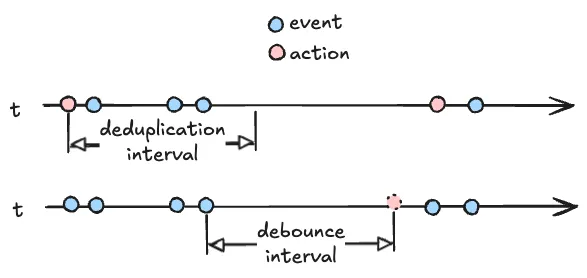
It's useful to contrast debouncing with deduplication - the key difference is which event from a sequence is processed. With deduplication the first arriving event triggers an immediate action and the rest - often containing the same data - are discarded within a deduplication interval. With debouncing an action is triggered by the last event, after no more events arrive within the debouncing interval. Each event arriving during debouncing interval postpones processing. The below diagram illustrates the difference.
Debouncing is reminiscent of time-based batching, where the batch is released after some idleness time. In stream processing this kind of batching is known as session windows1, that split data to be processed based on session gap (idleness interval). The key difference is that with batching and windowing all events are accumulated and processed, unlike debouncing where only the last event is of interest.
The work to be done to process a surge of redundant events can be minimized with debouncing. How does it relate to other techniques that allow systems to better cope with load? Throttling reduces the rate at which events are published or processed, but unlike debouncing, it doesn't reduce the total amount of work - the full event backlog is still processed. The goal of load shedding is to protect the system from overload, discarding any work that exceeds its capacity. Rate limiting is a simple approach to load shedding that constrains the throughput of accepted incoming requests or events. This is contrasted with debouncing, which does not discard any useful data but is only possible if newer events supersede the older ones.
There is a variety of use cases where debouncing could useful:
- stock market price feed processing
- high frequency sensor updates
- repeated web-hook invocations
- processing multiple user interface events once2: save document after inactivity, show autocompletion after user stopped typing, send analytics data once after multiple clicks, render a widget after scrolling stopped
- sending a user a reminder to come back to complete the session (e.g. a lesson or an order) after a period of inactivity
- providing fresh recommendations based on recent user activity
- invoking an expensive machine learning model to respond to user actions
Why is the technique called debouncing? The concept originates from electrical engineering and is used to counter contact bounce - current fluctuations causing a mechanical switch to bounce between on and off3.
We looked at the mechanics, purpose, applicability, and a simple timer-based implementation of debouncing. Then we contrasted it with other related techniques for managing work in progress, such as deduplication, batching, session windowing, throttling, and load shedding. Finally, we considered various applications where debouncing helps to improve efficiency or respond once to a sequence of events. This was just a brief high level overview of the concept — there's a more to dig into when it comes to a real-life, reliable and scalable implementation.
Updated 2026.08.06